> ## Documentation Index
> Fetch the complete documentation index at: https://docs.portalhq.io/llms.txt
> Use this file to discover all available pages before exploring further.
# Portal's MPC architecture
> This guide will go over the basics of Portal's MPC architecture for generating, backing up, and recovering a user's wallet.
### Overview
Portal leverages Multi-Party Computation (MPC) and specifically Threshold Signature Schemes (TSS) to allow multiple parties to sign transactions across key shares instead of a single private key to manage access to a crypto wallet that is traditionally used for crypto wallets.
Portal's implementation of MPC uses two sets of key share pairs (parallel 2 of 2 threshold - four shares total). Key shares are never reconstructed for signatures and generated and conducts signatures independently across each party involved.
Portal leverages an open-source and audited MPC protocol called CGGMP. Please reach out to learn more about our implementation and audits.
### Step 1: Generating a wallet
The **signing key shares** are used for signing transactions and the **backup key shares** are used for recovery if the device storing a signing key shares is lost.
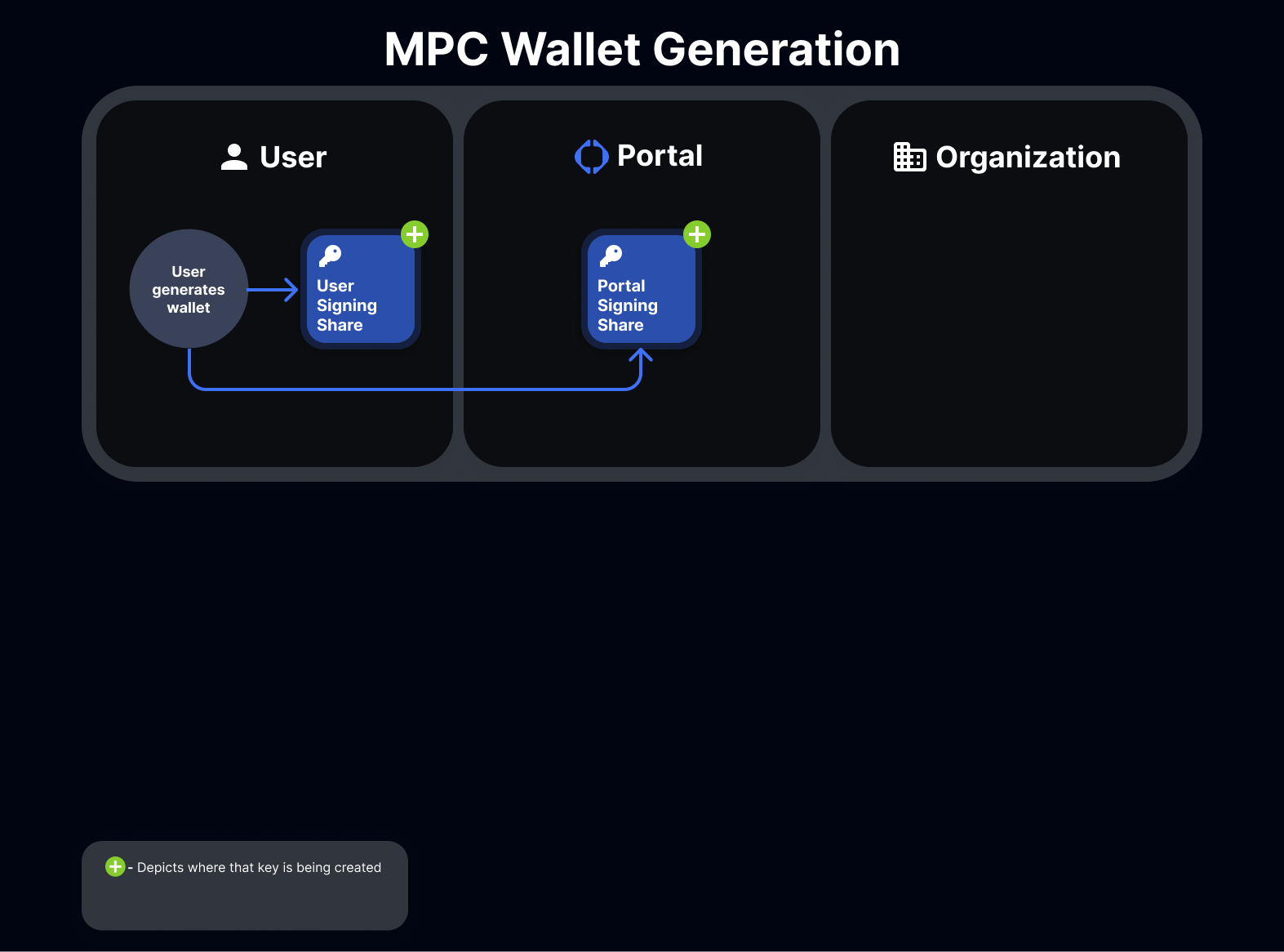 The user's **signing key share** is stored in their **mobile device's keychain**. The Portal signing key share is stored encrypted-at-rest. Learn more about Portal's security practices [here](https://www.portalhq.io/post/portal-security-principles-and-practices).
### Step 2: Backing up a wallet
The user's **backup share** is encrypted and sent to the **organization** where it is stored encrypted-at-rest by backup method. The decryption key for the user's backup share is sent to **Google Drive or iCloud.** The **custodian backup share** is also sent to the **organization** to store encrypted-at rest by backup method.
Portal only stores the **signing key share**, and so can only sign messages with the key share stored in the device's keychain. Likewise, to perform a recovery using the user's **backup share** only the **backup share** stored by the **organization** will work.
Only the **user signing share** can initiate transactions as all signatures may only originate from the user client.
This separation of concerns provides additional security constraints to ensure that a compromise of any one key share has additional authentication methods to sign an MPC transaction.
The user's **signing key share** is stored in their **mobile device's keychain**. The Portal signing key share is stored encrypted-at-rest. Learn more about Portal's security practices [here](https://www.portalhq.io/post/portal-security-principles-and-practices).
### Step 2: Backing up a wallet
The user's **backup share** is encrypted and sent to the **organization** where it is stored encrypted-at-rest by backup method. The decryption key for the user's backup share is sent to **Google Drive or iCloud.** The **custodian backup share** is also sent to the **organization** to store encrypted-at rest by backup method.
Portal only stores the **signing key share**, and so can only sign messages with the key share stored in the device's keychain. Likewise, to perform a recovery using the user's **backup share** only the **backup share** stored by the **organization** will work.
Only the **user signing share** can initiate transactions as all signatures may only originate from the user client.
This separation of concerns provides additional security constraints to ensure that a compromise of any one key share has additional authentication methods to sign an MPC transaction.
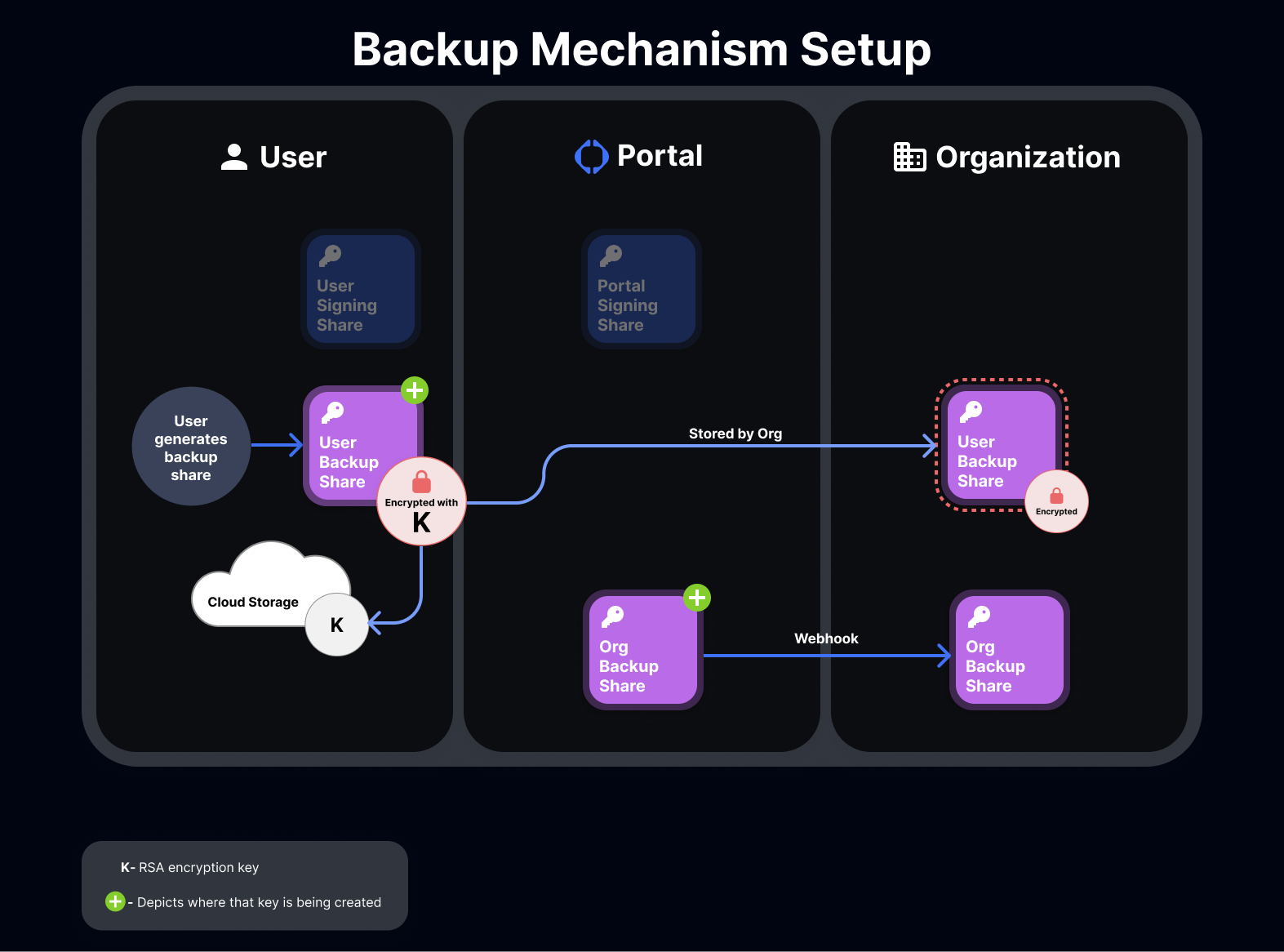 MPC backups allow your users to recover their MPC wallets in the event that their device is lost, stolen, or broken.
Backups are handled in two pieces: **user backup shares** and **custodian backup shares (organization backup shares)**.
At the time of recovery, these two backups are **used together** to generate new shares to be stored on-device, allowing the user to migrate their wallet with a new device.
Note: Portal shares (blue) and custodian shares (purple) are intentionally mismatched and parts of different signing thresholds and therefore cannot collude and sign transactions on behalf of users.
### Step 3: Recovering a wallet
MPC recovery allows your users to recover their MPC wallets in the event that their device is lost, stolen, or broken.
MPC recovery uses the MPC backups that a user has already ran to create a new set of signing shares.
Recovery is handled in two pieces: **user backup share recovery** and **custodian backup share recovery**.
MPC backups allow your users to recover their MPC wallets in the event that their device is lost, stolen, or broken.
Backups are handled in two pieces: **user backup shares** and **custodian backup shares (organization backup shares)**.
At the time of recovery, these two backups are **used together** to generate new shares to be stored on-device, allowing the user to migrate their wallet with a new device.
Note: Portal shares (blue) and custodian shares (purple) are intentionally mismatched and parts of different signing thresholds and therefore cannot collude and sign transactions on behalf of users.
### Step 3: Recovering a wallet
MPC recovery allows your users to recover their MPC wallets in the event that their device is lost, stolen, or broken.
MPC recovery uses the MPC backups that a user has already ran to create a new set of signing shares.
Recovery is handled in two pieces: **user backup share recovery** and **custodian backup share recovery**.
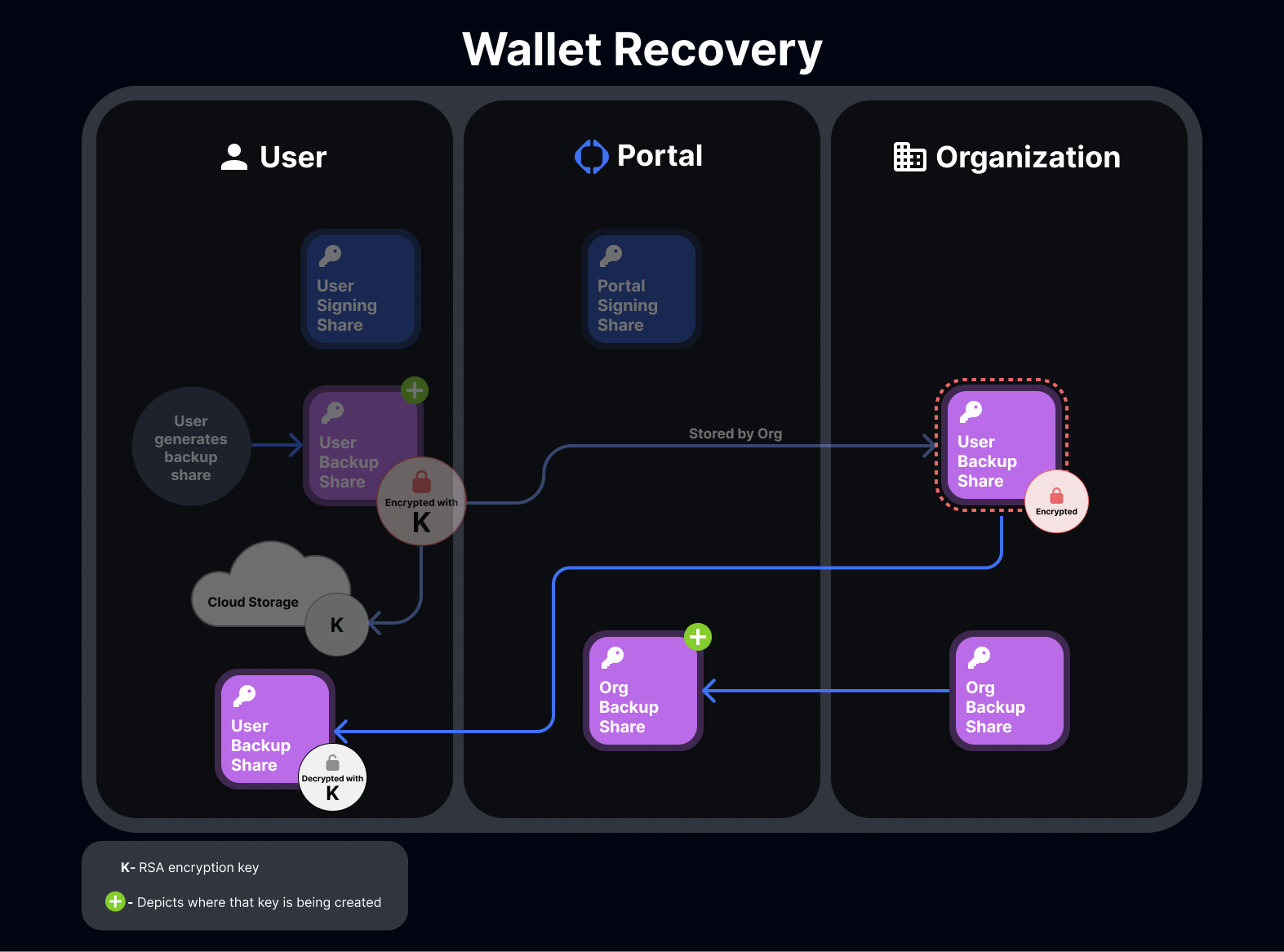 Recovery replaces a user's old signing shares on the device (if there were any) with a new pair of **signing shares**.