> ## Documentation Index
> Fetch the complete documentation index at: https://docs.portalhq.io/llms.txt
> Use this file to discover all available pages before exploring further.
# Presignatures
> Pre-compute MPC signing data ahead of time for faster transaction signing.
## Overview
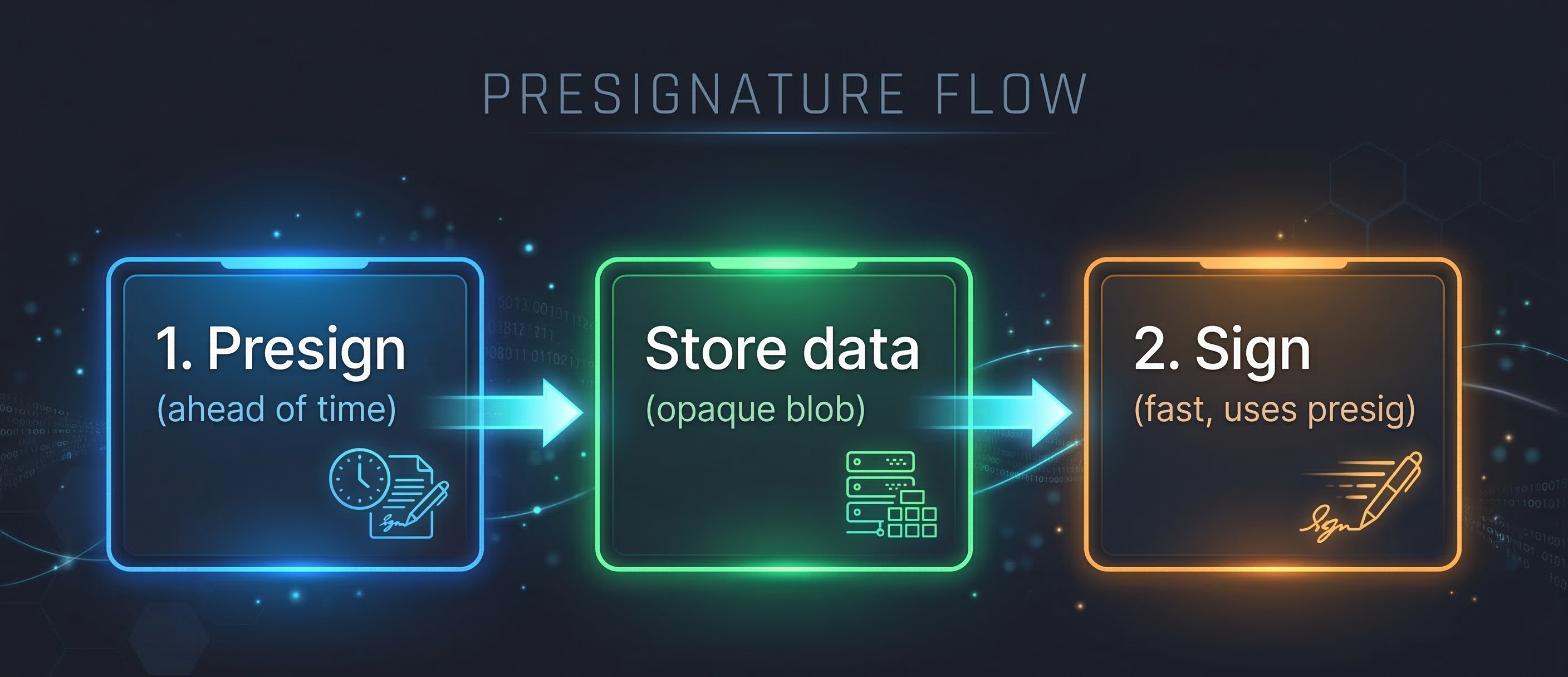
Presignatures allow you to split the MPC signing protocol into two phases:
1. **Pre-computation phase** — Generate a presignature ahead of time using the `presign` endpoint.
2. **Signing phase** — Pass the presignature to a sign, raw sign, or send asset endpoint to complete the signature faster.
By front-loading part of the cryptographic computation, the signing step completes faster. This is useful when you need lower-latency signing at transaction time or want to prepare signatures in advance for time-sensitive operations.
## How It Works
The Enclave MPC API supports two presignature storage modes:
| Mode | How it works |
| ------------------ | --------------------------------------------------------------------------------------------------------------------------------------------------------------------- |
| **Client-stored** | The presign endpoint returns an opaque `data` blob. Your application stores it and later passes it as `presignature` in a signing request. |
| **Portal-managed** | Portal stores the encrypted client presignature payload. Your application stores only the returned `id` and later passes it as `presignatureId` in a signing request. |
In both modes, the signing endpoint uses the pre-computed data to complete the MPC protocol faster.
 ## Key Details
| Property | Details |
| ---------------------- | ------------------------------------------------------------------------- |
| **Supported curves** | `SECP256K1` (EVM, Bitcoin). ED25519 (Solana) support coming soon. |
| **Default expiration** | 7 days from creation |
| **Maximum expiration** | 365 days from creation |
| **Active limit** | 100 presignatures per client |
| **Usage** | Single-use — each presignature can only be used for one signing operation |
## Use Cases
* **Low-latency signing** — Pre-compute during idle time so that user-facing sign requests complete faster.
* **Batch preparation** — Generate multiple presignatures in advance for a batch of upcoming transactions.
* **Time-sensitive transactions** — Prepare presignatures before a deadline so signing is fast when needed.
## Compatible Endpoints
Presignatures can be used with the following Enclave MPC API endpoints:
* **Sign** (`POST /v1/sign`) — RPC-based signing (e.g., `eth_sendTransaction`)
* **Raw Sign** (`POST /v1/raw/sign/SECP256K1`) — Sign a hex digest string
* **Send Assets** (`POST /v1/assets/send`) — High-level token transfer
Presignatures currently only support the `SECP256K1` curve. ED25519 (Solana) support is coming soon.
## Best Practices
* **For client-stored presignatures, store the `id` and `expiresAt`** alongside the `data` value. While the `id` is not required for signing, it is useful for bookkeeping and may be needed when communicating with Portal support.
* **For Portal-managed presignatures, store the `id` and `expiresAt`** so you can pass the `id` as `presignatureId` and clean up expired presignatures.
* **Discard expired presignatures** — set up a regular process to check `expiresAt` timestamps and clean up expired entries so you stay within the 100 active presignature limit.
## SDK behavior
The SDK manages presignatures automatically when you enable the **`usePresignatures`** feature flag. With the flag enabled, the SDK generates presignatures in the background and uses them during signing (e.g. `portal.request()` or send-asset flows) to improve latency
## Next Steps
Ready to use presignatures? Choose your platform:
* [Presignatures with Enclave MPC API](/apis/enclave-mpc/guide/presignatures) — For server-side or custom integrations.
* **React Native** — Enable the [`usePresignatures`](/sdks/react-native/guide/feature-flags#usepresignatures) feature flag when initializing Portal
* **Web** — Enable the [`usePresignatures`](/sdks/web/guide/feature-flags#usepresignatures) feature flag when initializing Portal
## Key Details
| Property | Details |
| ---------------------- | ------------------------------------------------------------------------- |
| **Supported curves** | `SECP256K1` (EVM, Bitcoin). ED25519 (Solana) support coming soon. |
| **Default expiration** | 7 days from creation |
| **Maximum expiration** | 365 days from creation |
| **Active limit** | 100 presignatures per client |
| **Usage** | Single-use — each presignature can only be used for one signing operation |
## Use Cases
* **Low-latency signing** — Pre-compute during idle time so that user-facing sign requests complete faster.
* **Batch preparation** — Generate multiple presignatures in advance for a batch of upcoming transactions.
* **Time-sensitive transactions** — Prepare presignatures before a deadline so signing is fast when needed.
## Compatible Endpoints
Presignatures can be used with the following Enclave MPC API endpoints:
* **Sign** (`POST /v1/sign`) — RPC-based signing (e.g., `eth_sendTransaction`)
* **Raw Sign** (`POST /v1/raw/sign/SECP256K1`) — Sign a hex digest string
* **Send Assets** (`POST /v1/assets/send`) — High-level token transfer
Presignatures currently only support the `SECP256K1` curve. ED25519 (Solana) support is coming soon.
## Best Practices
* **For client-stored presignatures, store the `id` and `expiresAt`** alongside the `data` value. While the `id` is not required for signing, it is useful for bookkeeping and may be needed when communicating with Portal support.
* **For Portal-managed presignatures, store the `id` and `expiresAt`** so you can pass the `id` as `presignatureId` and clean up expired presignatures.
* **Discard expired presignatures** — set up a regular process to check `expiresAt` timestamps and clean up expired entries so you stay within the 100 active presignature limit.
## SDK behavior
The SDK manages presignatures automatically when you enable the **`usePresignatures`** feature flag. With the flag enabled, the SDK generates presignatures in the background and uses them during signing (e.g. `portal.request()` or send-asset flows) to improve latency
## Next Steps
Ready to use presignatures? Choose your platform:
* [Presignatures with Enclave MPC API](/apis/enclave-mpc/guide/presignatures) — For server-side or custom integrations.
* **React Native** — Enable the [`usePresignatures`](/sdks/react-native/guide/feature-flags#usepresignatures) feature flag when initializing Portal
* **Web** — Enable the [`usePresignatures`](/sdks/web/guide/feature-flags#usepresignatures) feature flag when initializing Portal